
Jul 30, 2026
Quantizer support in Mediabunny v1.52.0

Vanilagy
Mediabunny v1.52.0 ships with quantizer encoding support for AVC, HEVC, VP9, and AV1!
What the hell is a quantizer
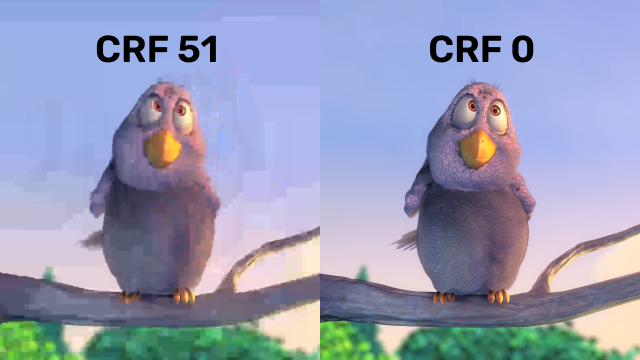
The quantizer is the knob inside a video encoder that tells it how much data to throw away for compression. A low quantizer keeps basically everything, a high quantizer throws most things away.
This works via rounding: Frames (or the delta between frames) are transformed to a bunch of integer coefficients, and these coefficients then get divided by the quantizer (I'm simplifying a little). Since you're working in integer space, a lot of numbers end up rounding to zero and get completely compressed away. When it's time to decode again, all of these numbers are multiplied by the quantizer again. This brings them roughly back to where they started originally, but since rounding took place, data loss has occurred. This is why these are considered "lossy" codecs. The reason this works so well is because humans can barely notice that data has been thrown away.
In contrast to setting the encoding bitrate (which gives you a roughly constant byte size per frame), setting the quantizer gives you a roughly constant quality per frame. This is often the more desirable behavior as you enable the codec to spend more bits when it has to (in complex scenes), and allow it to stay lean for simple scenes where not much is changing.
You may know this concept from FFmpeg's CRF (constant-rate factor), which is just another name for the same thing.
Using it
If you're already encoding with a quality level, you're done - this requires no code change:
const conversion = await Conversion.init({
	input,
	output,
	video: {
		bitrate: QUALITY_MEDIUM,
	},
});
await conversion.execute();
Old Mediabunny estimated a reasonable bitrate for the desired quality at the given dimensions, and that was it. New Mediabunny actually ensures that the quality is, in fact, medium-ly good for every frame and thus throughout the entire video.
If you want, you can control it more directly by pinning an exact quantizer value. The scale is codec-native, with lower meaning better: 0-51 for AVC/HEVC, 0-63 for VP9, and 0-255 for AV1.
video: {
	codec: 'avc',
	bitrate: new Quality({ quantizer: 26 }),
}
You can even change the quantizer per frame when driving the encoder yourself, for example to spend more bits on frames you care about:
const source = new VideoSampleSource({
	codec: 'avc',
	bitrate: new Quality({ quantizer: 26 }),
});

// Later, per sample:
await source.add(sample, { avc: { quantizer: 40 } });
Quantizer encoding works in the browser via WebCodecs, and in Node.js via @mediabunny/server, which now drives FFmpeg's encoders in constant-quantizer mode. For environments where quantizer mode is not supported but a subjective quality is used (like QUALITY_MEDIUM), it automatically falls back to bitrate mode.
New Quality API
Alongside this, the quality API got a general cleanup. Everything that affects encoding compression now flows through a single Quality class, which you can construct from a named level, a custom 0-1 value, or explicit rate control parameters:
new Quality('medium'); // Named level
new Quality(0.85); // Custom level
new Quality({ bitrate: 1e6 }); // Explicit bitrate, VBR
new Quality({ bitrate: 1e6, bitrateMode: 'constant' }); // CBR
new Quality({ quantizer: 26 }); // Explicit quantizer
new Quality({ quantizer: 26, bitrate: 1e6 }); // Quantizer with bitrate fallback
To truly welcome the new Quality class into Mediabunny, all fields previously named bitrate are now deprecated. The preferred field is now called quality:
const conversion = await Conversion.init({
	input,
	output,
	video: {
		quality: new Quality('medium'),
	},
});