

Nov 3, 2026
Project Sync: The journey to sample-perfect audio/video sync with WebCodecs

By Vanilagy
You would think that audio-to-video synchronization (AV sync) is mostly a solved problem these days, and you'd be right! But it's also very delicate, and every system must work correctly for it to be maintained. Any mistake or oversight anywhere in your media pipeline can break it.
Mediabunny prides itself on being a high-quality library, and I thought for the longest time that it had AV sync completely figured out. After all, it has been battle-tested after creating millions of new media files, and it's built on WebCodecs for doing audio encoding and decoding. WebCodecs is an API created by industry professionals and browser devs who have been doing media stuff for years or even decades and know all about AV sync.
But assumptions are just assumptions, and that isn't good enough if you want to build something perfect. So, let's try it out! Let's take a section of Big Buck Bunny containing a distinctive sound and transcode it using Mediabunny. Give it a listen:
Looks and sounds perfect to me! We can see that poor butterfly getting smacked by the apple exactly at the same time that we hear the impact sound effect.
Human perception is messy
But it is actually not synced up! The audio is in fact delayed here - we just can't tell because it's below the 125-millisecond threshold of humans noticing audio that lags behind video. And yes, this is actually something that's been measured! Interestingly, audio leading video is much worse and becomes detectable at only 45 milliseconds. My completely uninformed guess is that humans evolved to perceive delayed audio correctly because the speed of sound is incredibly slow in real life, so real life can "desync" as well!
The delay becomes really obvious if we do the conversion 64 times in a row, each time feeding the previous output into the current input:
Besides the quality having taken somewhat of a hit, the AV sync is spectacularly off now. It takes over two seconds before the audio even comes in, and the poor butterfly is long dead before we can hear the apple hit the ground. The media file is now also almost nine seconds in length, up from the initial five seconds.
Why is this happening?
So, where exactly is this delay coming from? It's certainly not coming from Mediabunny, because Mediabunny simply reads the file, passes the audio packets to an audio decoder, passes the output of that back into an audio encoder, and packages the output of that into the final media file. Both the audio decoder and encoder use WebCodecs, and timestamps aren't being modified either - so you'd assume that a decode->encode roundtrip like this one is well-behaved.
Let's dive deeper and see what the encoder does to our signal. We'll use a simple testing signal, in this case a sine wave whose frequency changes from 20 Hz to 100 Hz within 1 second using a log-space lerp, sampled at 48 kHz:
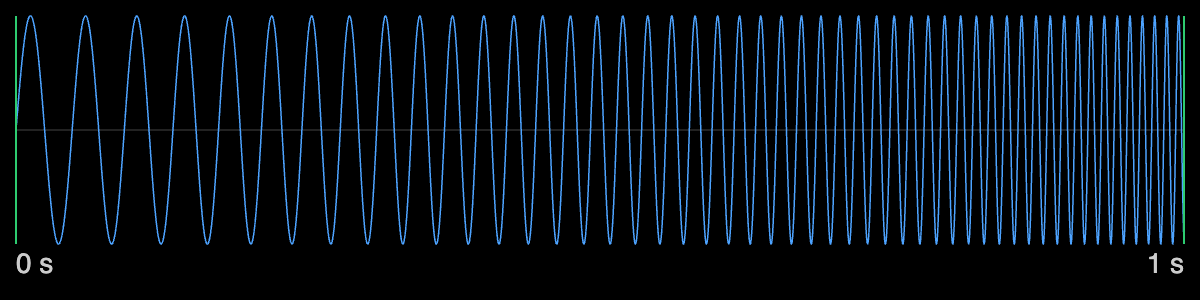
We encode that using the WebCodecs AAC AudioEncoder on a Mac, and it seems to work just fine at first. If we inspect the packet metadata, we can already tell that something is off: the first packet starts at 0.0 seconds, just like our signal, but the last one ends at 1.066666 seconds - so the encoder seems to have added ~0.066 seconds to our signal! If we actually decode what it created, we can see how our signal has changed:
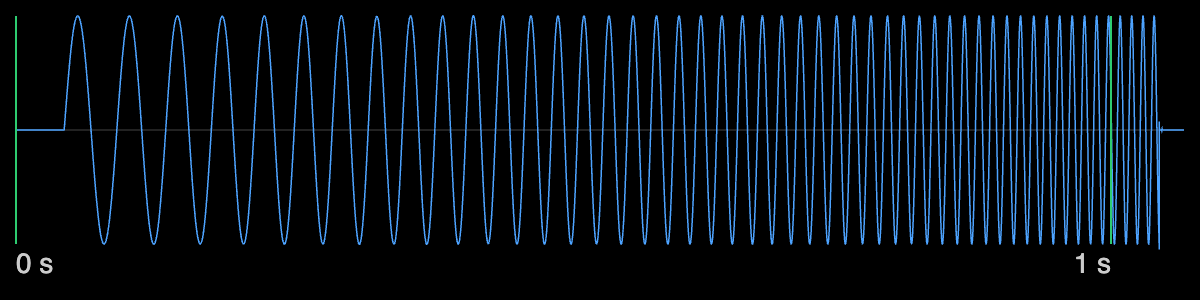
The encoder has not only lengthened our signal, it has delayed it! And every time we roundtrip this signal, it's delayed again. This is how it looks after eight roundtrips:
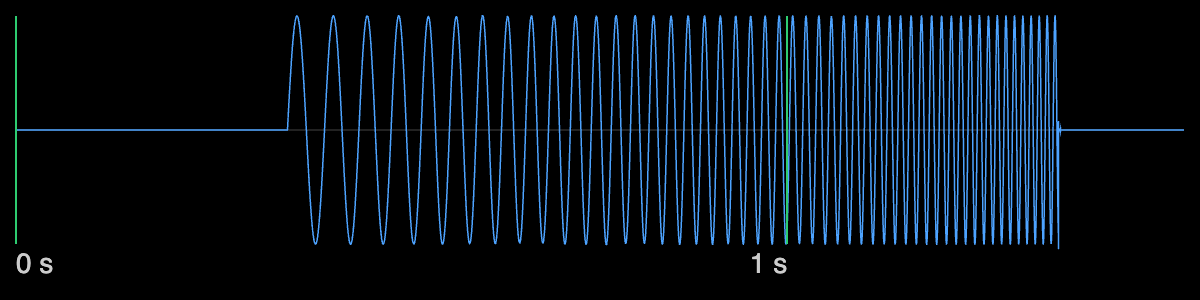
If we were to cross-correlate our original signal with the encoded one, we would find that they correlate the most with exactly 44 milliseconds of offset, meaning the encoded signal lags 44 milliseconds behind the input. At 48 kHz, this works out to exactly 2112 audio samples of delay. But why is this happening?
Why audio codecs add delay
What's going on here is that we are falling victim to uncompensated encoder priming delay. Audio codecs go to great lengths to reduce the number of bits they need to encode a given signal, and while many of them don't have a concept of a "key frame" (meaning that you can start decoding audio from any part in the file), they do take a while to converge to the correct output after you've started decoding. This means that information from previous packets can affect how the current one is decoded.
In AAC's case, what the codec does is actually quite simple: it breaks the signal down into 1024-sample AAC frames, each of which is compressed and encoded using a "modified discrete cosine transform" (MDCT), and two neighboring MDCT blocks must be overlapped to produce the correct result. This is why you need 2048 samples worth of packets to accurately reconstruct the latter 1024 samples.
FFmpeg's AAC encoder actually only adds the minimum required delay of 1024 samples. Apple's AAC encoder on the other hand, which we used in the above experiments, adds a delay of 2112 (1024 + 1024 + 64) samples instead. As far as I'm aware, why they chose this exact number isn't clearly documented anywhere.
Undoing WebCodecs' mistakes
So, audio encoders need to add delay to keep the input signal intact, but we'd also like it to stay in sync with the video. There are two obvious approaches:
- Pad the start of the input signal with silence to cover the encoder priming delay, then shift the entire signal back in time
- Discard the beginning of the input signal by however long the encoder priming delay is
Basically all encoders that I'm aware of choose the first option because it only adds data and removes none. So, WebCodecs adding some silence at the start is actually correct because if it didn't do that, we'd lose the beginning of our signal! What's not correct is pretending that this signal starts at timestamp 0. I believe this to be an oversight in both the WebCodecs spec and its implementations (and all of them do this wrong). There is a GitHub issue on this topic, but discussion has been going on for over three years there.
Waiting for the WebCodecs team to amend the spec and then for the browser vendors to subsequently implement and ship the change isn't an option for Mediabunny. I want it to produce correct files, now. So I started Project Sync, my effort to fix AV sync imperfections in Mediabunny once and for all.
The good news is that we can correct what WebCodecs gets wrong. Notice what happens if we shift the encoded signal by just the right amount (-44 ms in this case):
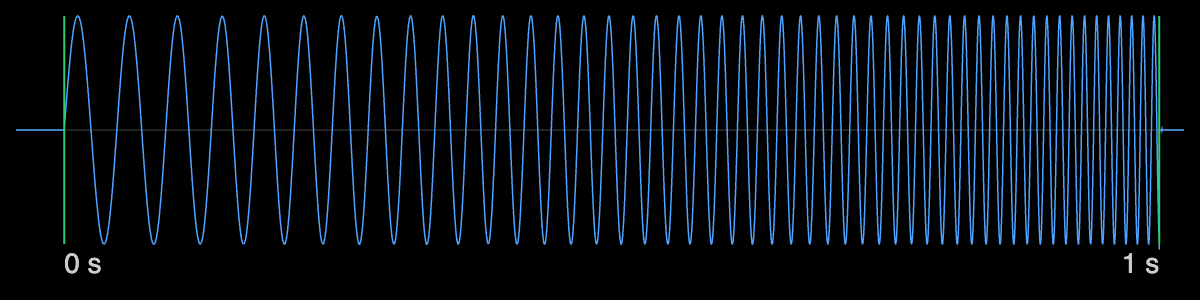
The resulting signal now protrudes on both ends, but our raw signal is not only perfectly contained in it, it's also perfectly in sync with the input again! That wasn't so hard, was it?
The difficulty is that Mediabunny has absolutely no idea what the encoder delay is because WebCodecs has no way of telling you. Add to that: it differs wildly from system to system. Sometimes it's 1024 samples, sometimes it's 2112, and in the case of Safari, it's technically 2112 but it additionally treats the first 1024 samples you give it as silence (due to a bug), meaning we must give it an additional 1024 samples of padding, landing us at a total of 3136 samples.
Instead of hardcoding all this, I decided that it's smarter for Mediabunny to figure it out empirically for every system it runs on. It works like this: You give the encoder an impulse signal with the impulse at sample 4096, meaning a signal that is 0 everywhere except for one point where it is 1. This is basically the discrete version of the Dirac delta function in math. Because this signal has such a clearly defined peak, if we roundtrip it through the encoder, the peak of the processed signal will hopefully tell us exactly how many samples of delay we have.
And indeed, if we do this with the AAC encoder, the processed signal has a very clearly defined peak:
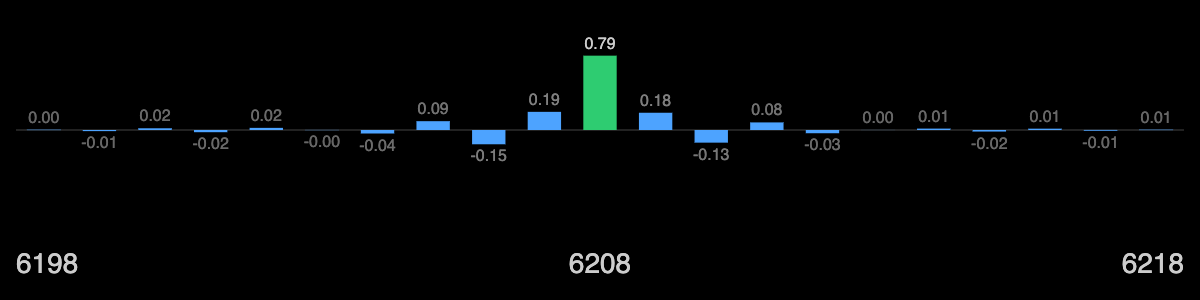
There is obviously some ringing around this peak, which is expected because a perfect peak would require that the codec maintain all frequencies equally. It doesn't; it throws some of it away due to its nature of being a lossy audio codec. But we only care about the peak, and the peak here happens to be at sample number 6208. If we subtract 4096 from it, we get exactly 2112 - the actual delay of this AAC encoder. Neat!
I've tried this across lots of different browsers and OSes and it always gave the correct answer, and it also works for Opus, which is another codec that browsers can encode.
Making negative timestamps work everywhere
So, the steps that Mediabunny must take for perfect AV sync are the following:
- Whenever an audio encoder is first used, run a small program that empirically measures its encoder priming delay on that system
- Encode the raw audio signal
- Shift all output packet timestamps into the negative based on the measured delay
In our case, the first packet's timestamp would come out to precisely -0.044 seconds. If you're not familiar with media processing, negative media timestamps may feel like they make little sense, but they're used all over the place in practice. FFmpeg uses exactly the same pattern. A common convention is that media is "presented" from timestamp 0, and anything before that is discarded.
The last missing piece in Mediabunny therefore was making sure that every muxer (the code that produces container files like MP4 or WebM) can actually deal with negative input timestamps. For a long time, this caused a validation error in Mediabunny because every format stores them in a slightly different way. Now that it basically became a necessity for AV sync, I went through each format to add support for negative timestamps:
ISOBMFF (e.g. .mp4 and .mov) signals negative timestamps through something called the "edit list". The actual media data is always written starting at t=0, and the edit list then trims off the start, which Mediabunny's and FFmpeg's readers implement as a negative timestamp shift.
Matroska (.webm and .mkv) technically supports negative timestamps up to around -32 seconds, but not every reader supports it (VLC 👀). Instead, it has a dedicated
CodecDelayelement that models this shift explicitly. Therefore, Mediabunny's Matroska muxer undoes the negative timestamp shift but then stores the amount of shift in that element.MPEG-TS's internal timestamps use modular arithmetic mod
, meaning they wrap around every seconds. A negative timestamp like -0.5 seconds is thus represented by the large internal timestamp 8589889592. It's then up to the reader to be smart enough to interpret this as -0.5 seconds instead of 95443.217689 seconds (it's ambiguous). Mediabunny and FFmpeg do this correctly because they have heuristics to detect exactly this kind of pattern, but VLC, for example, does not. So, this strategy cannot be used because it just confuses too many players. The better approach is to shift the entire composition forward by some constant amount of time, which gets rid of negative timestamps entirely while maintaining AV sync. I modified the HLS muxer, which is the main reason why MPEG-TS is created today, so that it now defaults to an internal timestamp shift of 10 seconds.
Packed audio formats like MP3 and ADTS don't hold timestamps, but they now contain the correct ID3v2 PRIV metadata indicating their exact place in an HLS playlist, compensating for encoder delay. Outside of HLS, MP3 can hold LAME-specific metadata that indicates the precise encoder priming delay, so negative timestamps are now used to signal exactly that.
Let that sync in
With the priming delay-compensated audio encoders, combined with the ability to read/write negative timestamps from/to container formats, Mediabunny now guarantees sample-perfect AV sync no matter how often you process the media (to the best of its ability).
To test it, let's reconvert that same Big Buck Bunny clip a total of 256 times:
The quality is still surprisingly good, and most importantly, the video and audio stayed perfectly in sync!
Seeing Project Sync come together has been very satisfying. The results have been live in Mediabunny since v1.63.0, so make sure to upgrade if you haven't yet.